
Forgot your Microsoft 365 password? How to get back in
Updated For Microsoft 365

You can reset your own Microsoft 365 password from the sign-in page if your admin has turned on self-service password reset and you have registered a phone or the Authenticator app. Otherwise your admin resets it for you.
Reset it yourself
Section titled “Reset it yourself”You need the phone or email address you registered as a sign-in method.
-
Go to m365.cloud.microsoft, type your work email address and select Next.
-
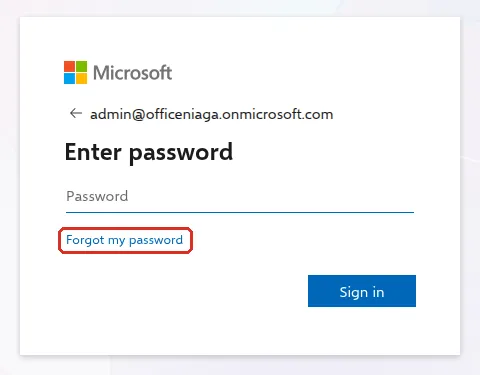
On Enter password, select Forgot my password. (On the first page, where you type your email address, the same link is called Can’t access your account?.) You can also go straight to passwordreset.microsoftonline.com.
-
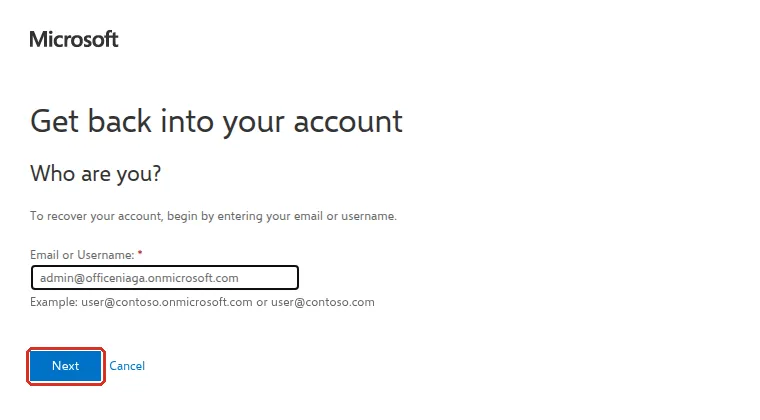
On Get back into your account, under Who are you?, check your email address is correct and select Next. If Microsoft shows characters in a picture, type them first.
-
Choose how to verify: a text message, a call, the Authenticator app or an email. Your company may ask for two of these.
-
Enter the code or approve in the app.
-
Type your new password twice and select Finish.
Sign in again with the new password. On your phone, Outlook and Teams will ask for the new password too.
If Microsoft tells you to contact your admin
Section titled “If Microsoft tells you to contact your admin”Self-service reset only works when your admin has turned it on and you have registered a method. Microsoft includes it in paid business plans, but not trials. If it is not available, ask your company admin to reset your password; they can follow reset a staff member’s password.
If nobody knows who your admin is, ask whoever set up your company’s Microsoft 365, or contact Office Niaga.
Change a password you know
Section titled “Change a password you know”If you remember your password and just want a new one, sign in to mysignins.microsoft.com/security-info. Find Password in the list and select Change, then follow the steps. Change Password in the menu on the left does the same.
Avoid getting locked out again
Section titled “Avoid getting locked out again”Once you are back in, register at least two ways to prove it is you on the Security info page, such as the Authenticator app and your mobile number. Then a lost phone or forgotten password does not lock you out.
Still stuck
Section titled “Still stuck”WhatsApp our support team at +60 16-916 3324.
Common issues
Microsoft says it could not verify my account.
Self-service reset is not turned on for you, or you have not registered a phone or the Authenticator app yet. Ask your admin to reset your password.
The reset code email never arrived.
Check your spam or junk folder. Microsoft sends it from msonlineservicesteam@microsoft.com or msonlineservicesteam@microsoftonline.com. Codes by SMS or the Authenticator app are usually faster.
What if our only admin is locked out or has left?
Contact Office Niaga with your company domain name. As the company that manages your Microsoft 365 subscription, we can help you get admin access back.
Was this article helpful?
Thanks for your feedback.
Sorry this didn't help. WhatsApp us and we'll sort it out with you.