
How Gemini handles your company data
Updated For Google Workspace

When you use Gemini with your Google Workspace work account, Google treats your prompts and Gemini’s answers as your company’s data, under the same agreement as your Gmail and Drive. This page sums up Google’s official commitments.
What Google commits to
Section titled “What Google commits to”Google’s Generative AI in Google Workspace Privacy Hub makes these commitments for Gemini in Workspace apps, the Gemini app and Gemini Notebook on a qualifying Workspace plan:
- No model training. Your prompts, files, emails and Gemini’s answers are not reviewed by people or used to train Google’s AI models outside your organisation without your permission.
- Stays in your organisation. Gemini does not share your prompts or its answers with other users or other organisations.
- Your existing protections apply. Security settings you already use, such as data loss prevention rules on supported plans, also apply to text Gemini inserts into email and documents.
The no-training promise is written into the Google Workspace Service Specific Terms, under “Training Restriction”, and your prompts count as customer data under Google’s Cloud Data Processing Addendum.
What Gemini can see
Section titled “What Gemini can see”Gemini works with the permissions each person already has:
- It only reads emails, files and chats the signed-in user can already open.
- If a file blocks a user from downloading, copying or printing it, Gemini will not fetch it for that user. Gemini also cannot read email or files protected with client-side encryption.
- A user’s Gemini conversations are visible only to that user, even inside a shared file.
If someone has access to a file they should not, fix the sharing, not Gemini. Gemini cannot see more than the person using it.
Controls for admins
Section titled “Controls for admins”In the Admin console, admins can:
-
Turn the Gemini app and Gemini Notebook on or off for everyone or one department.
-
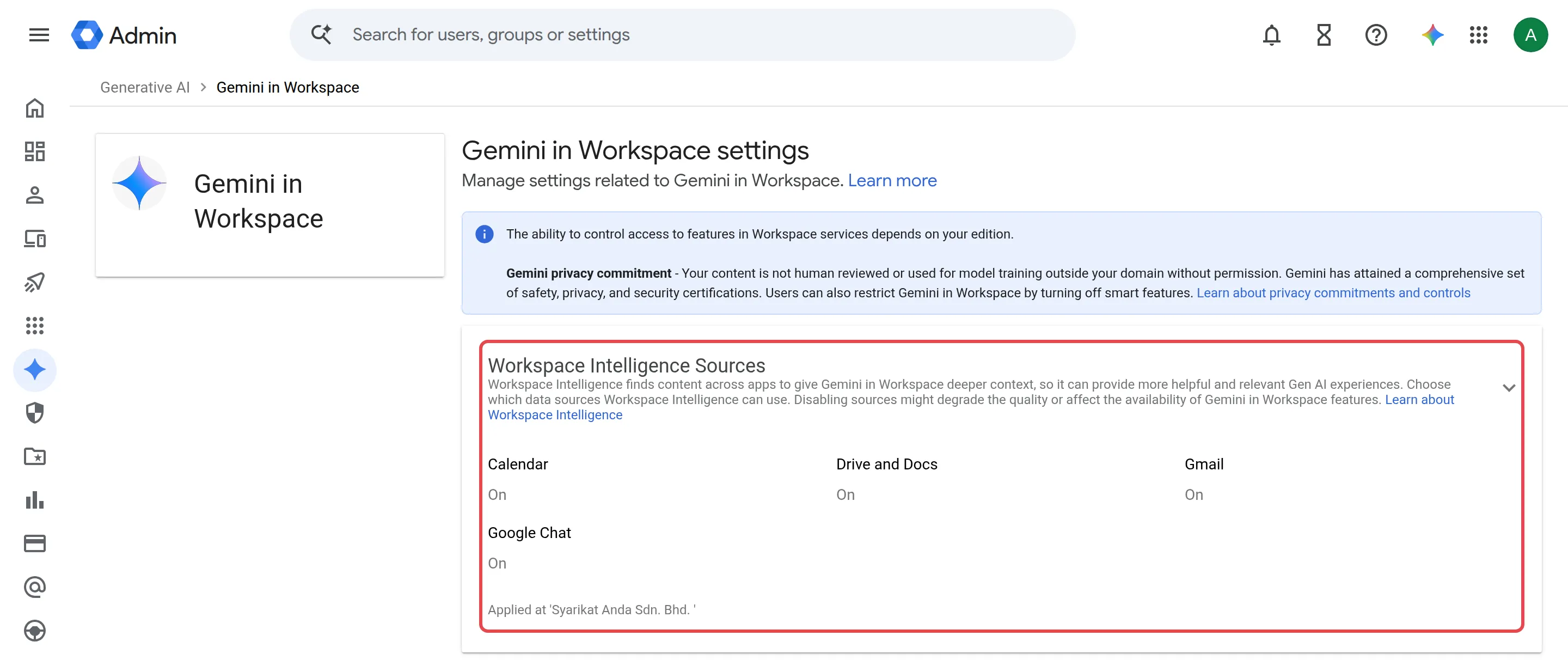
Choose which apps Gemini may search for context (Gmail, Drive and Docs, Calendar and Chat) under Generative AI > Gemini in Workspace > Workspace Intelligence Sources.
-
Decide how long Gemini app chats are kept (3, 18 or 36 months, or off) and whether users can delete Gemini chats.
-
Stop Gemini Notebook sharing outside the company.
See turn Gemini on or off for the steps.
Things to know
Section titled “Things to know”A few limits and differences are worth knowing:
- Personal accounts are different. Gemini on a personal Google account follows consumer terms, and chats there may be reviewed by humans.
- Gemini Notebook copies files. Drive files added to a notebook are copied into Gemini Notebook, and your data region settings do not apply to that copy. Gemini Notebook is not yet covered by Google’s HIPAA agreement or by Workspace data loss prevention rules.
- Gemini makes mistakes. Check anything important before you rely on it.
Government bodies that must run a data protection impact assessment (DPIA) can use Google’s DPIA support guide, linked from the Privacy Hub. See also Gemini for schools & government.
Still stuck
Section titled “Still stuck”WhatsApp our support team at +60 16-916 3324.
Common issues
Can Gemini show one staff member another person's files or emails?
No. Gemini follows your existing Google Workspace permissions. It only reads emails and files the signed-in user can already open, and each person's Gemini chats are private to them.
Is it safe to use Gemini in a personal Gmail account for work?
No. Personal accounts follow Google's consumer terms, where chats may be reviewed by humans and used to improve Google's products. Always use your work account for company information.
Does feedback I send about a Gemini answer go to Google?
Yes. If you click thumbs up or down and choose to include your prompt and the response, Google receives them. Google says feedback is not used to train the AI models behind Workspace, but it may be read by people, so do not send confidential data in feedback.
Was this article helpful?
Thanks for your feedback.
Sorry this didn't help. WhatsApp us and we'll sort it out with you.