
Ask an AI about this page
 ChatGPT
 Claude
 Perplexity
 Google AI Mode
 Microsoft Copilot
 Grok
 Mistral Le Chat
Add licences, upgrade your plan or renew Google Workspace
Adding licences, upgrading your plan and renewing your Google Workspace subscription all go through Office Niaga, not the Google Admin console. Your subscription is resold, so Google asks you to contact your reseller to buy licences or change plan, rather than using Billing in admin.google.com.
Adding licences for new hires
Section titled “Adding licences for new hires”Order the licence before the new staff member’s first day, so their account is ready when they start.
-
Tell Office Niaga how many extra licences you need, through the billing portal or WhatsApp support.
-
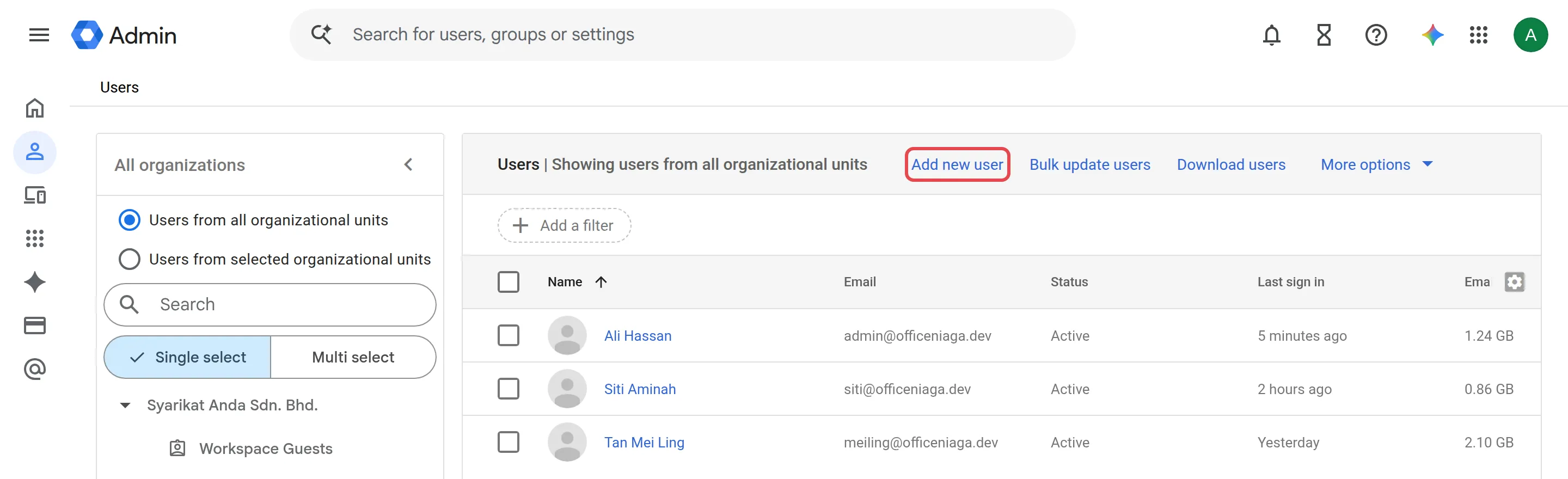
Once the licence is added to your account, create the user: in the Admin console go to Menu → Directory → Users and click Add new user. See Add a user for the full steps.
Reducing licences at renewal
Section titled “Reducing licences at renewal”Licences are billed for the year ahead, so tell Office Niaga before your renewal date if you need fewer, for example after someone leaves the company. See what to do when staff leave for the offboarding checklist.
Upgrading from Business Starter to Standard or Plus
Section titled “Upgrading from Business Starter to Standard or Plus”A normal upgrade moves every user to the new edition at once. The Admin console and the console we order through cannot upgrade only some accounts.
You can keep two plans on one domain, for example Business Starter and Business Standard, if each plan has at least 20 users. Office Niaga sends this order to Google for you. See Use more than one Google Workspace plan for the rules and for the options for smaller groups.
If one team only needs a shared inbox, check whether a group email covers it before upgrading everyone. For storage problems, see storage full first.
For current prices or a quote, see pricing or ask Office Niaga.
Still stuck
Section titled “Still stuck”WhatsApp our support team at +60 16-916 3324.
Common issues
Can I buy more Google Workspace licences myself in the Admin console?
No. Because you bought through Office Niaga, licence purchases go through us. Ask through the billing portal or WhatsApp.
What happens to my other users when I upgrade from Business Starter to Standard?
A normal upgrade moves every user to the new edition at once. To keep some users on Starter, each plan must have at least 20 users, and Office Niaga must send a special order to Google. See Use more than one plan.
Can I reduce licences before my Google Workspace renews?
Yes. Tell Office Niaga how many licences you need before your renewal date so the new invoice reflects the right count.
Was this article helpful?
Thanks for your feedback.
Sorry this didn't help. WhatsApp us and we'll sort it out with you.